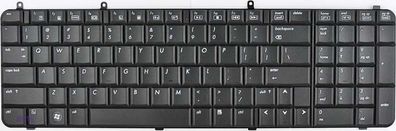
Laptop keyboard UK Genuine Laptop Keyboard Replacement for HP DV Series AT5A.
- Seller:
-
jaqal
Top Seller

- Feedback:
- Location:
- 154 more ads from this seller
- Entered/Renewed:
- 2 years ago
- Ad Views:
- 2,597
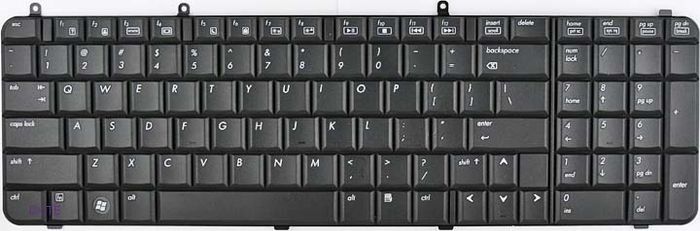
Laptop keyboard UK Genuine Laptop Keyboard Replacement for HP DV Series AT5A.
Description
Genuine Laptop Keyboard Replacement for HP DV Series AT5A.
Prior to replacing your HP DV Series AT5A laptop keyboard, make sure to remove the battery and disconnect the ac adapter from your laptop.
The first step to replacing your laptop keyboard is to remove the screws from the back of your HP DV Series AT5A . Sometimes your laptop will have a picture of a keyboard next to the screws that need to be removed. Otherwise, see your AT5A laptop manual for details.
Above your AT5A laptop keyboard, you have a cover panel. If required, remove this part to easily access your keyboard.
If you have screws above your HP DV Series AT5A Keyboard, remove those screws.
Now that you have removed all the screws, you are ready to remove and then replace your new AT5A laptop keyboard.
To remove your AT5A Keyboard, take a thin object and pry the keyboard out between the keyboard and motherboard. Be careful when removing your HP DV Series AT5A Keyboard.
Now that your keyboard is loose, simply disconnect your AT5A keyboard. In order to disconnect the keyboard, pay attention to the keyboard connector and connector cable. Unlock the connector cable device and remove your laptop keyboard. Your AT5A connector cable should be easy to remove by simply sliding it out.
Now that your AT5A keyboard has been removed, get ready to install your new AT5A laptop keyboard. Look at the back of the keyboard. If you see any screw holes, you will have a good idea of where to place the screws back in at the bottom of your HP DV Series AT5A laptop.
Connect your AT5A keyboard to the motherboard keyboard connection slot. Secure the AT5A keyboard cable. Now turn your keyboard in place, and align the grooves on the bottom of your keyboard with your palmrest or plastic bezel. Secure your laptop keyboard in place, make sure it fits properly and is snug. Now simply place the screws back in place.
Congratulations! You just removed and replaced your New HP DV Series AT5A Laptop Keyboard.
 DeliveryPost/CourierTo be arranged PaypalTo be arranged
Asking Price: €10  No swaps
More Similar Ads
See more in our Laptop Parts and Accessories category available today