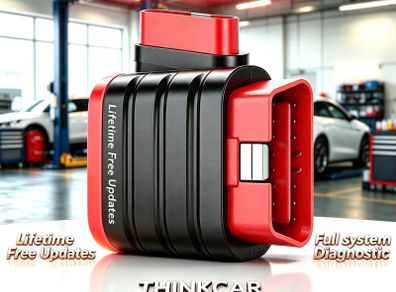
THINKCAR THINKDIAG MINI 2026 Bluetooth OBD2 Scanner Full System Automotive Diagnostic Tool Car Code Reader with Lifetime Free Updates
- Seller:
- Collection-in-Dublin1/7/9/11
- Feedback:
- Location:
- 7258 more ads from this seller
- Entered/Renewed:
- 2 days ago
- Ad Views:
- 66
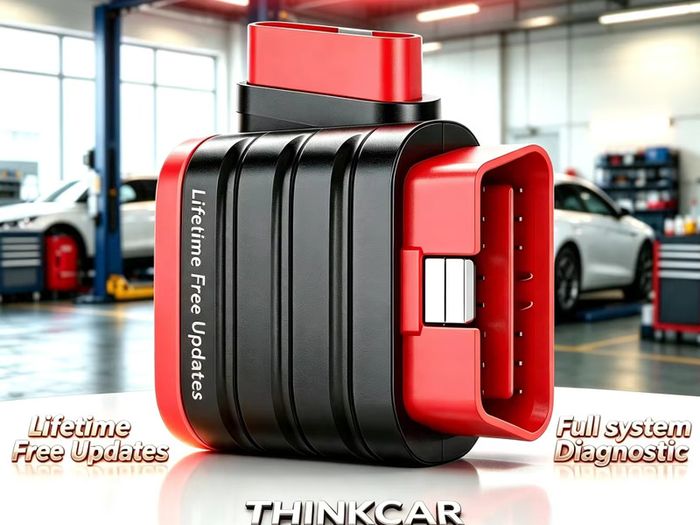
THINKCAR THINKDIAG MINI 2026 Bluetooth OBD2 Scanner Full System Automotive Diagnostic Tool Car Code Reader with Lifetime Free Updates
Description
Condition:
New
100% Positive feedback, Buy with confidence from an trusted experienced seller
All item are new and not open to offers. May do a deal if buying multiple items but this item is priced to sell and will not be discounted further
More ads here https://www.adverts.ie/member/2024014/ads
Can post same working day once paid by 5pm
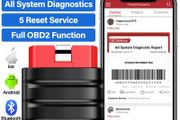
New Thinkdiag Mini brings you a new diagnostic experience
1. Support Android 5.0 and above & IOS 9.0 and above system smartphones, the product is small in size, and can be connected to diagnose cars anytime, anywhere.
2. Support Bluetooth 6.0 connection, efficient and stable connection to mobile phones.
3. Support 126+ car brand models with full-system diagnosis free updates for life, covering more than 98% of the world's models, and diagnose your car's system failure at any time.
4. 10 OBD/EOBD functions are free for life, if your car engine fails, you can solve minor car faults at home.
5. Support 12 languages to meet the operating needs and experience of different people from all over the world. (English,French,German,Spanish,Italian,Portuguese,Japanese, Russian,Polish,Traditional Chinese,Turkish,Greek)
Tips:No Reset Service, lifetime free use if need reset service contact seller recommend other model, thanks
How to Use the THINKDIAG mini?
Step1: Download the "ThinkDiag" in the APP store or in GooglePlay store.
Step2: Open the THINKDIAD APP, click on"Sign Up",verification code will be sent to the email you input, if you did not got, please check the spam.
Step3: Click on "Activate" to open the activation page, you need to input the serial number and an 8-diagit activation code is on the first page of the Quick Start Guide.
Step4: Plug THINKDIAG mini into the vehicle's OBDII port, there will be a red light which indicates the device is powered on.
Step5: Open the THINKDIAG APP, it will automatically search for activated devices, select your device and connect to it via Bluetooth in the APP. The indicator will turn to flashing blue.
Step6: In the "Diagnostics" interface of the App, you will need to download the corresponding diagnostics software when first apply"All System Diagnostic"and"OBD Functions".
 DeliveryPost/CourierTo be arranged Paypal
Asking Price: €59 (Price Non Negotiable)  No swaps
More Similar Ads


![Xgecu T48 [tl866-3g] Programmer 10 Adapters 31000+ Ics For Eprom/mcu/spi/nor/nand Flash/emmc/ Ic Tester Replace Tl866cs Tl866ii](https://media.adverts.ie/eyJidWNrZXQiOiJtZWRpYS5hZHNpbWcuY29tIiwia2V5IjoiYjExODI1MTVjMDM0YmMzYmZmOWJhYWM3ZDdiZjA2NDFkZWU4OGNjMTZjMTUyYjE4ZGE2YjI2ZjU0YWQyMDk2OC5qcGciLCJvdXRwdXRGb3JtYXQiOiJqcGVnIiwiZWRpdHMiOnsicmVzaXplIjp7IndpZHRoIjoxODAsImhlaWdodCI6MTIwfX19?signature=fa3c0acd0ac4110dc3a3f217e4a8903e8bb65662938bb2641828256470c7d02a)


See more in our Other category available today