PhotoClub.7910
Best Price is WoW Price

Categories
- Member since:
- 21/12/2011
- Last online:
- 28/10/2026
- Location:
- Ballyphehane, Cork
Activity
- Active:
- 1,477
- Sold out:
- 1,515
- Withdrawn:
- 69
- Units sold:
- 1740
Feedback Score [410]
-
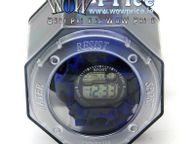
35145 SCMI Water Resist Sport Digital Watch
€53 Features: 6 Digits LCD Display Display Hour, Minute, Second Week 12/24H format selectable, Auto Calendar Chime hourly and Daily Alarm 1/100 second Chronograph with split function Operational Manual: At any mode, press A key then El. backlight will last for 3s. * In normal Mode, Press D key to check Month and Date In normal Mode, Press key to check Alarm time Press B key to convert mode: In normal display modes: Press - Chronograph Mode - Alarm Setting Mode-Time Setting Mode Chronograph funcion: In normal display mode: press B key enter Chronograph mode Press D to start, press D again to suspend, press D again to continue, press D to suspend again.......when suspend,press C key back to 0:00:00. In Chronograph mode, press D key to start, press C key enter into split function and get the first group record, but the second group is still processing in the back ground, press C key again to run the third group record, press Cagain to stop the running of the second group and read the second record; but the third group is still processing in the back ground......when the final group finished, Press D key to stop the SPL function, press C key to read the final group(SUM) record, press C key again to clear the record to 0:00:00. Alarm Setting in normal display Mode, press B key twice enter into Alarm Mode, and Alarm Hour is flashing. Press D key to adjust the correct hour for your Alarm. Press C key and the Alarm Minutes is flashing. Press D key to adjust the correct minute for your alarm Press B key to exit. Alarm & Chime ON/OFF In normal display mode press Cand D key together to ON/OFF the alarm. If the icon appears in the corner, the alarm is on. If the icon disappears, the alarm is off. Press B key to exit. In normal display mode, press Band C key together to ON/OFF the hourly chime If all the week icons (MO/TU/ WE/TH/FR/SA/SU) appear, the Chime is on; if all the week icons disappear, the Chine is off. Time Setting flashing. Press D key to reset the Seconds to zero. In normal display Mode, press key three times to enter time setting mode and the Seconds will be Press C key the Minute will flash. Press key to adjust the correct Minutes. Press C key the Hours will flash. Press D key to adjust correct Hours Press C key the Date will flash. Press D key to adjust correct date Press C key the Month will flash. Press D key to adjust correct Month Press C key the Date will flash. Press D key to adjust correct date Press C key the week will flash. Press D key to adjust the correct week. Press B key to exit. Package Included: 1x SCMI Water Resist Sport Digital Watch